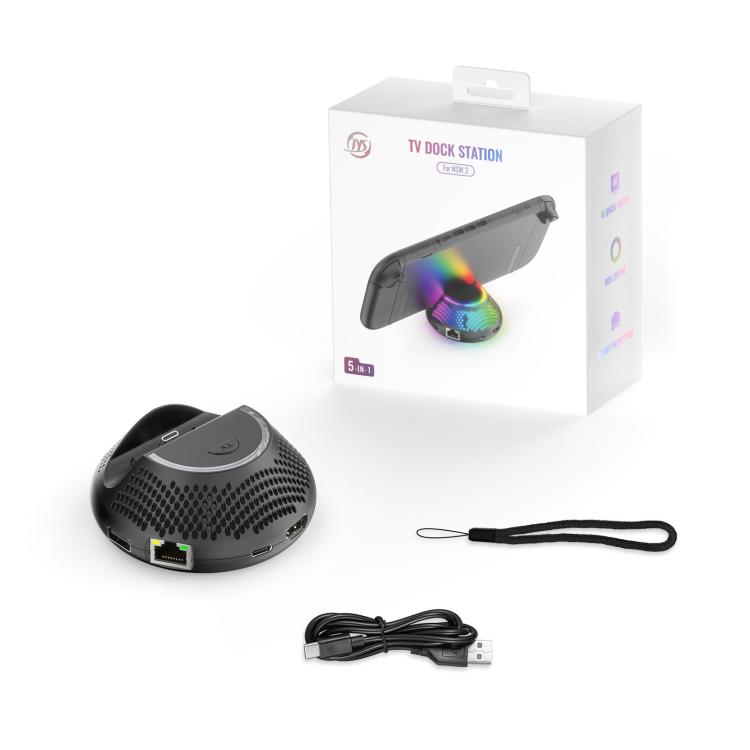


For Nintendo Switch 2 JYS 4K 60Hz TV Dock 5-In-1 HUB With Gigabit Ethernet Port RGB Ambient Lighting
For Nintendo Switch 2 JYS 4K 60Hz TV Dock 5-In-1 HUB With Gigabit Ethernet Port RGB Ambient Lighting
Sale
Sold out
Pre-order
Regular price
R 639.00
Regular price
Sale price
R 639.00
Unit price
per
Pay in monthly instalments with

Spread the cost
Mobicred is a third-party credit option. Approval and terms are determined by Mobicred.
- Approval by Mobicred
- Rate & fees in your pre-agreement
- Repayments confirmed before acceptance
- Your interest rate, fees and repayment schedule are shown in Mobicred's pre-agreement.
- Approval and your credit limit are determined by Mobicred.
- Review the credit terms before accepting the agreement.
Available payment options are confirmed at checkout.
Continue to checkoutDon't have Mobicred yet? Visit Mobicred →
Credit is subject to Mobicred approval and terms. Your limit, interest rate, fees and repayment schedule are disclosed by Mobicred before acceptance. Mobicred terms and conditions
Duties & Import Tax Information
In Stock
Processing: 1–3 days
Couldn't load pickup availability


Product details
Brand:JYS
Type:
Charger & Power
Description
1. A 5-in-1 TV dock compatible with Nintendo Switch 2, supporting 4K 60Hz HDMI output, built-in Gigabit Ethernet port, and RGB lighting effects for seamless handheld/TV mode switching.
2. TV Mode Key
-- One-Cast Switch button enables instant screen switching between handheld and TV modes.
-- Initial connection: Automatically activates TV output when the console is docked.
3. Communication Status Indicator: The dock features an LED to display connection and projection status between the dock and console.
4. RGB Ambient Lighting
-- 5 color modes: Red, Green, Blue, Purple, Gradient (default).
-- Power-on self-test sequence: Red → Green → Blue → Normal mode.
-- Memory function: Saves the last-used lighting mode automatically.
Setup Guide:
1. Connect Power & HDMI
(1) Insert the original power adapter into the dock’s Type-C port.
(2) Plug an HDMI cable into the dock’s HDMI port.
2. Power On: Connect the original power adapter to an outlet.
3. Link to TV: Directly connect the HDMI cable to the TV’s HDMI port (do NOT use HDMI switchers/converters).
4. Select HDMI Source: Switch the TV to the corresponding HDMI input (select the correct port if multiple exist).
5. Dock the Console: Power on the Switch 2, wait for the HOME menu, then insert the console into the dock (remove bulky cases first).
6. Verify Indicator: The status LED should illuminate (if not, press the Switch 2 power button again).
7. Confirm Display: Check the TV for video output (may require brief buffering).
Specifications:
1. Power Input: Original PD charger (Type-C, 20V/3A)
2. Network Port: RJ-45 Gigabit Ethernet
3. Video Output: HDMI 4K 60Hz
Questions about features, compatibility, or warranty? Chat with our local support team!