



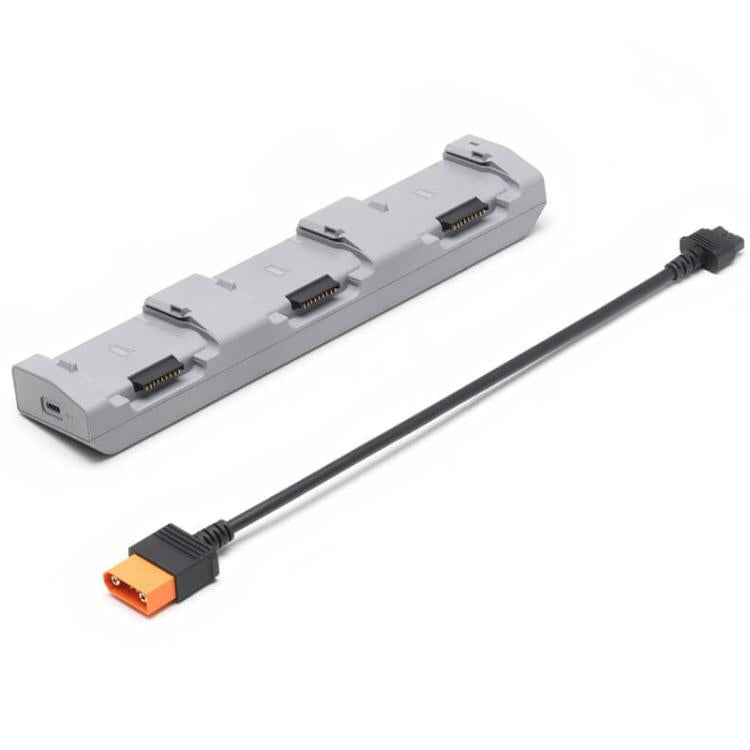


Original 240W Charging Manager for DJI Matrice 4D Series
Original 240W Charging Manager for DJI Matrice 4D Series
Sale
Sold out
Pre-order
Regular price
R 2,739.00
Regular price
Sale price
R 2,739.00
Unit price
per
Pay in monthly instalments with

Spread the cost
Mobicred is a third-party credit option. Approval and terms are determined by Mobicred.
- Approval by Mobicred
- Rate & fees in your pre-agreement
- Repayments confirmed before acceptance
- Your interest rate, fees and repayment schedule are shown in Mobicred's pre-agreement.
- Approval and your credit limit are determined by Mobicred.
- Review the credit terms before accepting the agreement.
Available payment options are confirmed at checkout.
Continue to checkoutDon't have Mobicred yet? Visit Mobicred →
Credit is subject to Mobicred approval and terms. Your limit, interest rate, fees and repayment schedule are disclosed by Mobicred before acceptance. Mobicred terms and conditions
Duties & Import Tax Information
In Stock
Processing: 1–3 days
Couldn't load pickup availability


Product details
Brand:DJI
Type:
Other
Description
1. When used with a 240W desktop charger or DJI Power 1000 outdoor power supply, it can simultaneously connect three Matrice 4D series batteries and charge them sequentially based on their remaining battery levels
2. Supports standard mode and standby mode charging. Standard mode charges each battery sequentially to 100%; standby mode charges each battery sequentially to 90% and maintains that charge level for quick use
3. Product model: CHX230-240
4. Applicable power adapter: DJI 240W desktop charger
5. Applicable battery model: BPX230-6768-22.14
6. Operating temperature: 5 - 40 degrees Celsius
7. Input: 16.8-25.5 volts, maximum 12.1 amps
8. Package contents: Charging Manager x 1, SDC Fast Charging Cable x 1
Important notes:
1. When using the Charging Manager to charge the battery, please use the DJI 240W Desktop Charger to power the Charging Manager
2. The Charging Manager is only compatible with DJI Matrice 4D series batteries for intelligent flight battery charging. Do not use the Charging Manager to charge batteries of other models
3. When using the Charging Manager, place it on a stable surface and ensure proper insulation and fire prevention
4. Do not touch the metal terminals with your hands or other objects. If foreign objects are attached to the metal terminals, wipe them clean with a dry cloth
Questions about features, compatibility, or warranty? Chat with our local support team!


